


16 Levels
DUSTBOX - Lo-Fi Sampler Effects Plugin
DUSTBOX - Lo-Fi Sampler Effects Plugin
Couldn't load pickup availability
Free plugin · Lo-fi sampler effects
Seven classic effects. One dusty box.
DUSTBOX brings the character of the late-90s groove samplers to your DAW. Vinyl compression, bit-crushing, filters, tape echo, tempo-synced chops and more, all in one hardware-style plugin. Load it on a drum bus, a sample or a whole beat, hit a pad and shape the sound with three knobs.
Download blocked by your browser? Get the installer as a .zip instead.

The sound of the classic groove samplers
The effects on those old samplers were a big part of the sound: drums squashed until they breathe, samples that sit behind the beat, and a layer of dust over everything. DUSTBOX is built around that idea, with effects tuned to be musical straight away rather than clinical.
Intuitive front panel design
Everything lives on one screen. Pick an effect from the seven lit pads, and the amber display and the three big knobs update to match. Mix blends the effect with your original sound and Output matches levels, for every effect.
One-touch effect pads
Switch effects instantly. Changes crossfade, so there are no clicks.
Settings for every effect
Each effect remembers its own knobs, so you can flip between them freely.
Mix and Output
Blend in parallel and compare at equal loudness, without extra tracks.
Output meter
See your level at a glance, from green through to the red.
Inside the box
The signature dusty sound
01 / Vinyl Sim
Heavy compression and soft saturation glue your drums together. A warm, band-limited tone takes off the modern sheen, surface noise adds hiss, crackle and rumble, and a slow wobble brings the feel of a worn record or tape.
- CompSquash and thicken; also darkens and saturates
- NoiseHiss, random crackle and low rumble
- Wow/FlutterPitch wobble, from subtle drift to warped vinyl

Early-sampler grit
02 / Lo-Fi
Drop the bit depth and sample rate to get the crunchy, aliased character of early samplers, then smooth the top end with the tone control.
- Bits2 to 16 bit
- Rate1.5 kHz to 44.1 kHz
- ToneLow-pass to tame harsh aliasing

Sweeps and saturation
03 / Filter+Drive
A resonant low-pass filter feeding a saturator. Automate the cutoff for builds and breakdowns, or open it up and use Drive alone for warmth and crunch.
- Cutoff40 Hz to 18 kHz
- ResonanceFrom smooth to squelchy
- DriveLevel-compensated saturation

DJ-style kill EQ
04 / Isolator
Three bands split at 250 Hz and 3 kHz. Boost a little or kill a band completely for mixer-style drops, filtered intros and telephone vocals.
- LowKick, bass and body. Kill to +6 dB
- MidSnare, vocals, keys. Kill to +6 dB
- HighHats, air and crackle. Kill to +6 dB

Dark tape-style echo
05 / Delay
Repeats that darken and saturate as they fade, like a tape echo. Turn the time knob while echoes ring out for pitch-bending dub throws.
- Time10 to 1,500 ms
- FeedbackUp to 95% for long, saturating repeats
- LevelEcho volume; your dry signal always passes

Tempo-synced chops
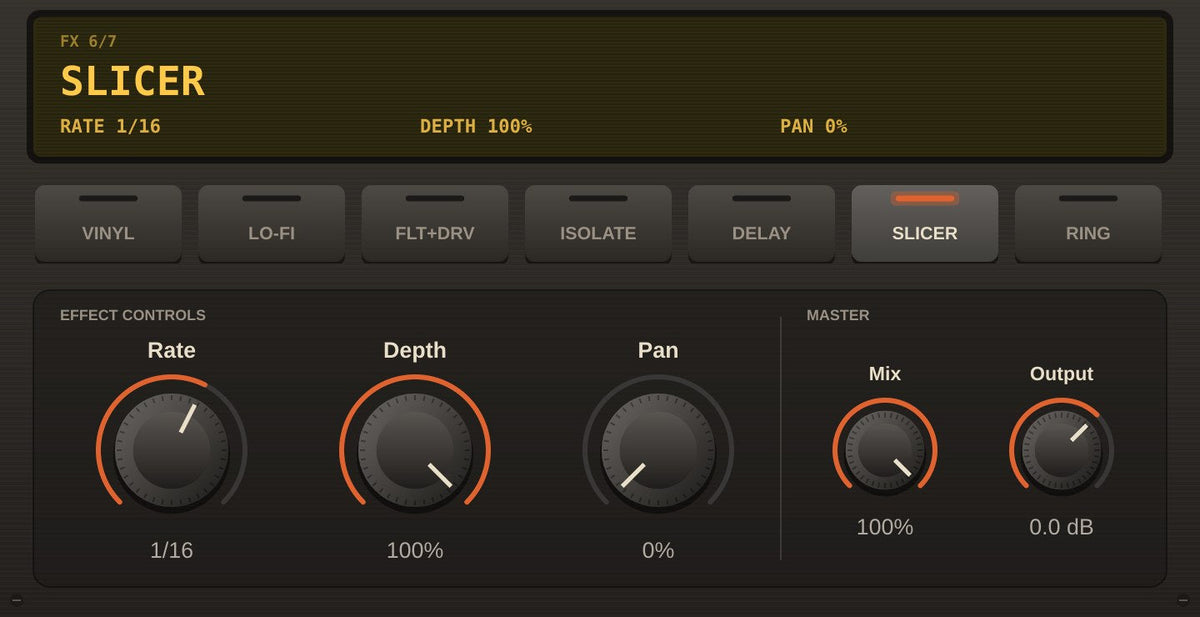
06 / Slicer
A rhythmic gate locked to your DAW's tempo and song position. Chop pads, chords and vocals, or bounce alternating slices between the left and right speakers.
- Rate1/4, 1/8, 1/8T, 1/16, 1/16T, 1/32
- DepthHow far the sound drops between slices
- PanPing-pong slices left and right

Metallic texture
07 / Ring Mod
Multiply your sound by a tone for bell-like, robotic and metallic textures. An LFO sweep adds movement; blend it in with Mix for subtle colour.
- Freq20 Hz to 3 kHz
- SweepLFO depth, up to two octaves
- Speed0.05 Hz to 10 Hz

Made for your workflow
Full automation
Every knob, plus the effect choice itself, can be automated from your DAW.
Recalls with your project
All seven effects' settings save with your session and DAW presets.
Mono or stereo
Works on mono and stereo tracks, from single hits to full mixes.
Standalone app
Run a turntable, sampler or audio input through DUSTBOX without opening a DAW.
What's included
- DUSTBOX Windows 64-bit VST3 effect plugin
- Optional standalone application
- Windows setup installer with uninstaller
- 14-page illustrated PDF manual with every control explained and 13 starting-point settings
100% free
Start getting dusty for free
No trial, no limits, no catch. Download DUSTBOX, put it on your drums and hear the difference.
Download blocked by your browser? Get the installer as a .zip instead.
System requirements
| Operating system | Windows 10 or 11, 64-bit |
|---|---|
| Plugin format | VST3 (64-bit). Standalone app included. |
| Compatible hosts | Any 64-bit VST3 host, such as FL Studio, Ableton Live, Reaper, Studio One, Bitwig, Cubase and MPC software on Windows |
| Disk space | About 25 MB |
| Not supported | macOS, and standalone MPC or Force hardware |
Before you download
The installer is not yet code-signed, so Windows may show a "Windows protected your PC" screen. Click More info, then Run anyway. Version 1.0.0.
DUSTBOX is an independent product inspired by classic late-90s samplers. It is not affiliated with, endorsed by or connected to Roland Corporation or the BOSS brand.