


16-levels
DUST RACK - Vintage Sampler Instrument
DUST RACK - Vintage Sampler Instrument
Couldn't load pickup availability
16 LEVELS / DUST RACK
Fresh ideas.
Dusty circuitry.
A vintage-inspired one-shot sampler and bass instrument for sounds with texture, weight and a little history.
30 pages · Windows v1.1.1 · Setup, sampling, chopping, modulation, effects and the latest cue-edit tools.

WATCH DUST RACK IN ACTION
Hear the dust. See the workflow.
170 starting points
Bass, Bells, FX, Leads, Pads, Plucks, Synth Key and Synths.
Visual trimming
Waveform markers and a moving playhead for hands-on edits.
Print the character
Resample the chain internally. Repeat to build up the wear.
Low-end muscle
Subtractive bass and sample-following LOW END layering.
01 / ONE-SHOT SAMPLER
Find the sound. Make it yours.
Load a factory sound or import your own sample and play it chromatically. Shape Start, End, Tune, Fine, Attack, Decay, Release and Velocity. Switch between ONE SHOT, GATE, CHOKE and LEGATO.
Trim by eye. Play by feel.
A visual waveform, moving playhead and draggable start/end markers keep your edits connected to the sound.
02 / CONVERTER & PRINT
Wear it into the record.
RATE, BITS, GRIT, ALIAS, INPUT and OUTPUT bring vintage converter character to your samples. Use linked record-speed pitch and duration, then PRINT the processing chain into a fresh internal sample.
One pass is only the beginning.
Print again to accumulate processing and degradation. Capture up to 30 seconds of your live output with RECORD OUTPUT, then use the result as a new sample. Export processed WAVs and individual chops for your projects.
03 / BASS & LOW END
Put weight under the dust.
Blend two oscillators and a sub oscillator with detune, glide, low-pass filtering, resonance, drive and a filter envelope. SAMPLE→FILTER routes your sample through the filter.
Give the sample a foundation.
LOW END analyzes the sample’s fundamental region and layers synthesized bass/sub tone. Shape the blend with SOURCE↔SYNTH, SUB TUNE, FOLLOW and SATURATION.
04 / DILLA TIME & WEAR
Leave room for the human.
DRAG, PUSH, LOOSE and GHOST add controlled timing and velocity variation. AGE, DUST, DRIFT, DROP and HUM shape wear in the audio.
Choose your era.
1990, 1996, 2002 and ABUSED circuit states change the instrument’s character. Virtual RAM modes bring vintage limits when you want them; Unlimited keeps all included sounds available.
05 / YOUR RACK
Five finishes. The same worn soul.
Choose Burgundy, Cream, Blue, Grey or Orange. Each retains the engraved DUST RACK nameplate, scratched metal, dusty hardware, wooden cheeks and monochrome LCD.
Keep what works.
Save and load .dustrack presets with sample, settings and skin included. Mark favorites and browse your own User/Presets and User/Sounds folders.
06 / CHOP, STRETCH & PLAY
Turn a sample into a playable idea.
Build up to 32 cues with visual waveform editing, MIDI cue placement, PLAY THRU and ALL CUES editing. Add individual tape slowdowns, reverse pickups, filter sweeps and reverb throws when cues trigger.
Independent pitch and time stretching works on samples and chops. Use tempo sync, estimated BPM/key detection, source-grid snapping and per-cue tempo fitting to shape the phrase around your track.
Keep your crate close.
Search and preview sounds, mark favorites, add tags and browse custom folders. Create layered pads, 32-step chop grooves, granular textures and loops.
07 / MODULATION & EFFECT SEQUENCING
Give every pass some movement.
Two LFOs, a modulation matrix and low/high-pass filters add motion and tone control. Build rhythmic treatments in the effect sequencer with its own preset collection and internal clock, including playback while your DAW transport is stopped.
Use performance macros to shape the sound, then save embedded-audio presets, favorite your best programs and return to your own User folders. UNDO/REDO keeps experimentation within reach.
08 / NEW IN VERSION 1.1 — WORKSHOP


More ways to find your next sound.
- Smart chop suggestions: audition a proposed layout before applying or rejecting it.
- SAMPLE LOCK: try preset treatments while retaining your source audio and cue bank.
- Crate chains: import several sounds to pads together, with optional level matching and root tuning.
- Live resampling: record up to 30 seconds of actual plugin output, including your performance and effects.
- Per-cue timing: fit cues to beats and edit their time and pitch independently.
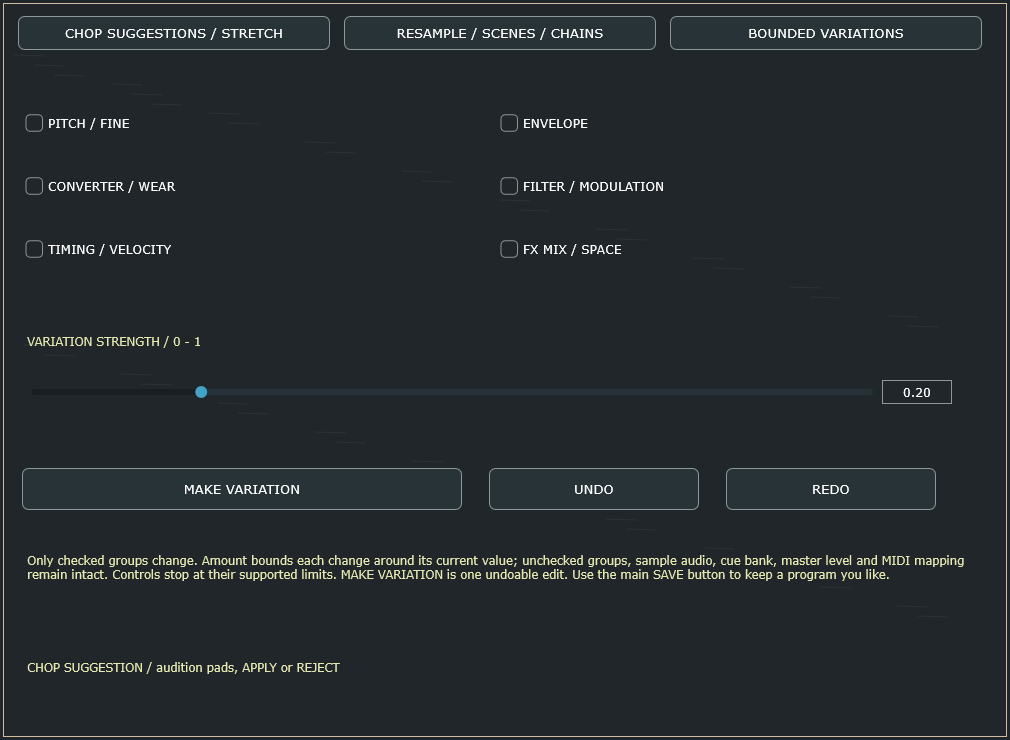
- Bounded variations: choose which sound-design groups may change and how far they can move.
- Four performance scenes: store and recall macro, granular, effect and groove settings, with optional MIDI CC selection.
WHAT YOU GET
Your rack. Windows and macOS.
- DUST RACK for Windows and macOS. Windows includes the x64 VST3 instrument and standalone application.
- 170 categorized factory sounds, five worn UI finishes and a downloadable PDF user manual (Windows v1.1.1).
- Preset loading/saving, Favorites and a User folder.
Before you load it.
Available for Windows and macOS. On Windows, the VST3 instrument needs a compatible 64-bit VST3 host; the standalone can run independently. Use the installer for your operating system. Internet access is required to purchase, download and activate, and to renew activation within each 30-day offline period. Each purchased license supports three computers. After purchase, select LICENSE → GET MY KEY in the plugin or get your license key here. Sign in with the email used for your order, copy your DR1 key, and select ACTIVATE KEY. Keys are generated automatically in the portal.
Recommended factory-library setting: Unlimited RAM. Smaller virtual RAM modes can reject larger sounds when ENFORCE RAM is enabled. PUSH introduces a declared performance-buffer latency of up to 30 ms. BPM and key detection are estimates. The Windows installer is currently unsigned.
DUST RACK / 16 LEVELS
Build something
with a little dust.
One-shot sampling. Bass weight. Character you can print.
GET DUST RACK — $39