


16 Levels
REPRINT - Tape Generation Loss Plugin
REPRINT - Tape Generation Loss Plugin
Couldn't load pickup availability
Free plugin · Tape generation loss
Every copy leaves a trace.
From a fresh studio print to a worn-out dub, REPRINT brings magnetic saturation, softening highs, tape motion and oxide wear to your drums, samples and full mixes. Turn GENERATION to hear the character of repeated record/playback transfers build up, one copy at a time.
Your free download includes Windows setup, the macOS source-build setup, the six-page guide, source code and checksums. The macOS setup requires build tools and has not yet been tested on a Mac.

Featured video
Watch REPRINT in action
Take a closer look at REPRINT in this featured video.
More than turning up distortion
Generation loss is the sound of a recording being copied again and again. REPRINT builds up saturation and compression, high-frequency loss, hiss, pitch variation, transient softening, stereo drift and wear across virtual tape transfers. Continuous and stepped generation modes let you move between subtle color and twelve-copy decay.
Generation 0–12
Start clean, add one print, or push through progressively degraded copies.
Magnetic character
Drive and bias shape the tape response; head bump adds low-end weight.
Living tape motion
Separate wow and flutter controls bring slow drift and faster pitch movement.
Age and wear
Balance softened tone, noise and stochastic dropouts to suit the recording.
A machine you can see and feel
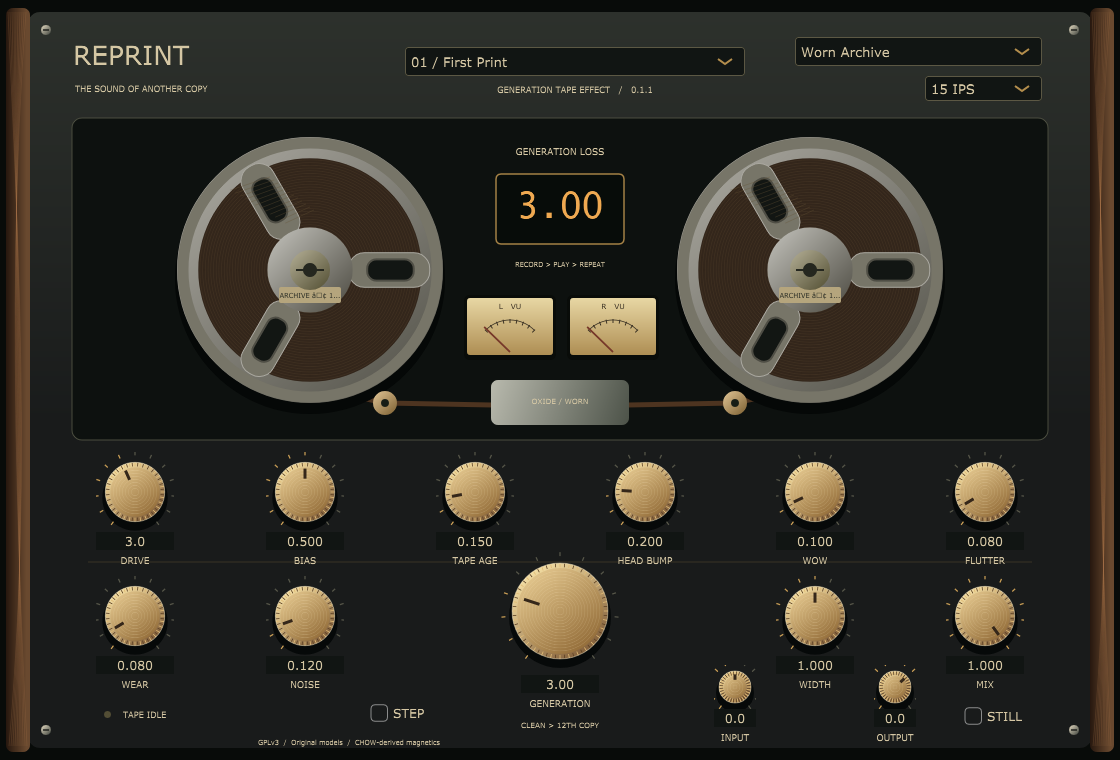
Two animated reels, traveling tape, warm meters and a central generation window bring the workflow onto one hardware-inspired panel. Dark metal, wood side cheeks and brass knobs set the mood. Reels follow host playback or incoming audio; STILL freezes the visuals while processing continues.
Four original sound profiles
Change the machine. Change the memory.
- Studio MasterCleaner, broader-band color.
- Consumer ReelWarm home-recording texture.
- Worn ArchiveAged metal, stained labels and worn sound.
- Dub MemoryNarrower cassette-inspired coloration.
Each model changes the reel design, hubs, materials and panel details. These are original profiles, not exact named-hardware emulations.

Shape your print
Record
INPUT, DRIVE and BIAS set the level and magnetic response.
Playback
7.5, 15 or 30 IPS, HEAD BUMP and TAPE AGE shape the contour.
Degrade
GENERATION, WOW, FLUTTER, WEAR and NOISE create accumulated character.
Blend
WIDTH, MIX and OUTPUT place the print in your track.
Seven starting points
First Print · Studio Glue · Living Room Dub · Archive No. 7 · Ghost of a Copy · Pocket Memory · Parallel Print.
Begin with First Print for gentle color, try Archive No. 7 for an aged recording, or blend Parallel Print behind your original transients.
Made for your session
Automation & recall
Audio settings automate and save with your DAW project.
Mono or stereo
Use it as an effect insert on individual tracks, buses or full mixes.
Parallel processing
Blend the treated sound with MIX and compare with matched OUTPUT levels.
Standalone app
Process live audio input in the optional development app.
What's included
- Windows 64-bit VST3 effect and optional standalone app
- Windows setup installer with matching front-panel icon and uninstaller
- macOS source-build setup for universal VST3, AU and standalone targets
- Six-page illustrated installation and user guide (PDF)
- Corresponding GPLv3 source code, notices and checksums
100% free
Make a copy worth keeping.
Get REPRINT for $0.00. Finish the free checkout to receive the download bundle, then pick the installer for your system.
System requirements
| Windows | Windows 10/11, 64-bit VST3 host, .NET Framework 4.8. Compiled installer included. |
|---|---|
| macOS | macOS 11+, CMake 3.22+ on the command line and Xcode Command Line Tools. Source-build setup; no precompiled macOS release. Mac compilation and installation remain unverified. |
| Formats | Windows VST3 and standalone. macOS source targets VST3, AU and standalone. |
| Use | Audio effect for a computer DAW; not an instrument or a standalone MPC/Force hardware plugin. |
Before you download
Development release 0.1.1. Installers are unsigned; macOS files are not notarized. Windows DSP/host checks and plugin validation passed. The macOS build and install workflow is untested.
REPRINT incorporates GPLv3-compatible code derived from CHOW Tape Model with required notices and corresponding source included. It has an original identity and interface. Current checksums are included in the corrected download bundle.