


16-levels
DUST MACHINE PRO - Boom Bap Multi-Effect Plugin
DUST MACHINE PRO - Boom Bap Multi-Effect Plugin
Couldn't load pickup availability
Boom bap multi-effect · Windows VST3 + standalone · MPC Standalone
Dust your drums. Warm your samples. Print your sound.
DUST MACHINE PRO brings sampler-style crunch, worn tape, vinyl texture and drum-bus punch into one hands-on rack. Turn the big DUST dial for fast character, then shape each stage and capture the result. A detailed engraved gold faceplate and five vintage-inspired skins put the controls right where you need them.
New · MPC Standalone version
DUST MACHINE PRO now runs right on your MPC. No computer needed. The MPC Standalone version works on MPC firmware 3.10.1 and loads as an insert effect, with touchscreen pages laid out for the Q-Links and the 20 factory presets built in.
macOS version coming soon
The desktop version is currently for Windows. A macOS version is coming soon.

See it in action
Five stages. Your order. Your character.
Sampler-style crunch
Adjust bit depth, sample-rate coloration and five sampler-inspired sound profiles.
Tape movement
Add saturation, wow/flutter and generation loss.
Vinyl texture
Blend generated surface noise and record wear with noise-follow control.
Drum-bus punch
Shape attacks, compression and tone with high-pass and low-pass filtering.
Inside the dust machine
One dial, instant character
01 / The rack
From subtle warmth to heavily degraded loops, balance DUST with the original signal and set how hard you drive the effects.
- DUST Overall degradation macro
- INPUT Wet-chain drive with overload indication
- WET MIX Blend processed and original audio
- TONE Filter, punch and compression controls
Build your own chain
02 / Workflow & sound profiles
Drag the five processing stages into any of 120 orders. Compare two sound settings and choose a sampler profile independently of the faceplate.
- REORDER Sampler, Tape, Vinyl, Filter and Drum Bus
- ON / LOCK Bypass stages or keep their settings across presets
- MATCH A/B Approximate RMS matching by attenuation
- PROFILES Five nominal bit/rate/circuit combinations

Capture, chop, repeat
03 / Sampling & resampling
Load a WAV or record the processed output into a six-take tray. Inspect waveforms, edit chops, fit loops to host bars and export audio for your next beat.
- RESAMPLE Capture up to 30 seconds
- CHOPS Markers, zoom, zero snap and WAV export
- KEEP PITCH Pitch-preserving tempo fit with Drums/Smooth modes
- PRINT SOUND Bake final pitch and record-speed settings

Finish the take
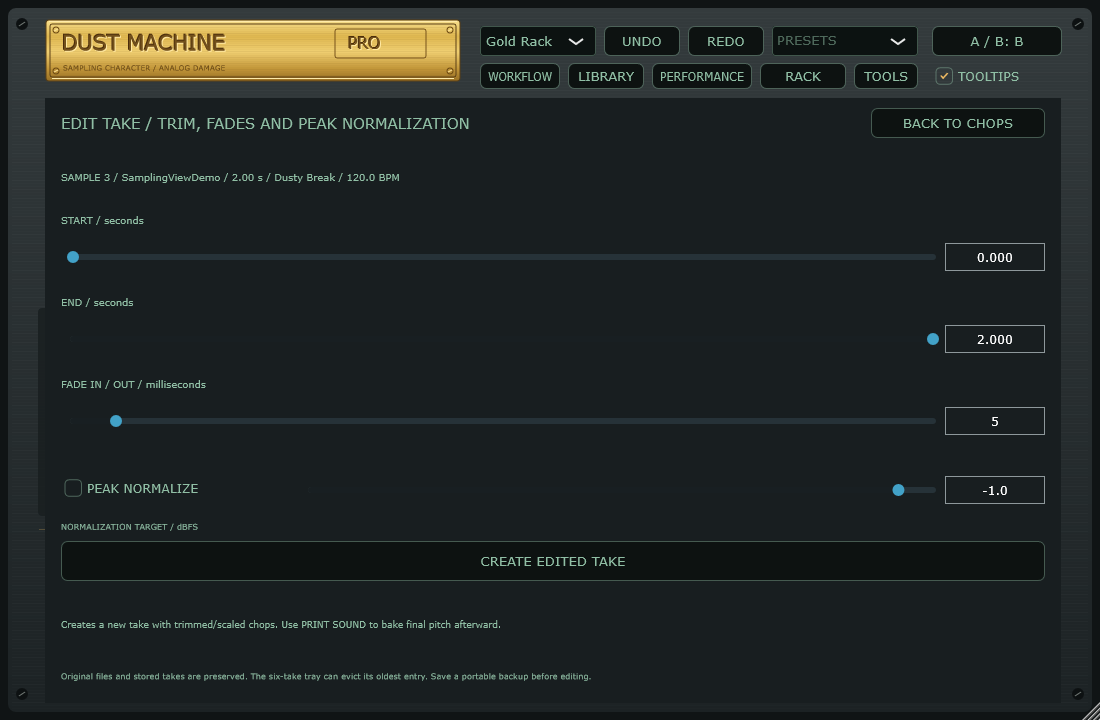
04 / Trim, fade & normalize
Create an edited take without overwriting its source. Set start/end points, soften the edges and adjust stereo sample peaks together.
- TRIM Choose start and end in seconds
- FADES Up to 100 ms, capped by take length
- NORMALIZE Optional sample-peak target; not LUFS
- CHOPS Retain and rebase markers inside the edit

Five faceplates. Mix the look and the sound.
Gold Rack, Linn Cream, BIG BLUE, Dusty Cream and Rossum. Keep SKIN SOUND LINK on for a matching sound profile, or switch it off and pair any skin with your chosen tone. Gold and Linn use intentional custom rates. The circuits are sampler-inspired approximations.
Made for your workflow
MPC Standalone
Runs directly on MPC hardware with firmware 3.10.1. No computer needed.
20 starting points
Factory presets, user presets, favorites and randomization locks.
MIDI Learn
Assign DUST, filters, THROW and STOP with conflict warnings.
Pitch > Sample
Global pitch plus ORIGINAL, 45 > 33 and 33 > 45 speed choices.
Optional hover help
Tooltips on by default, with a resizable interface.
What's included
- Windows 64-bit VST3 effect plugin and standalone application
- Windows setup installer with uninstaller
- 20 factory presets and five UI skins
- 11-page illustrated installation and user guide
Starting at $29
Put some dust on it.
A hands-on rack for drums, sample loops and resampling. Windows VST3 + standalone, plus an MPC Standalone version for firmware 3.10.1. macOS coming soon.
System requirements
| Operating system | Windows 10 or 11, 64-bit |
|---|---|
| Format | 64-bit VST3 audio effect; standalone application included |
| DAW | A Windows VST3 host. Testing is underway in FL Studio, Ableton Live and MPC Software. |
| MPC Standalone | MPC hardware running firmware 3.10.1. Loads as an insert effect, no computer needed. |
| macOS | Coming soon. The current download does not include a Mac build. |
| Hardware | The Windows version requires a Windows computer. The MPC Standalone version runs directly on MPC hardware. |
Before you buy
Current build: 0.12.0-rc1 release candidate. Automated checks pass; cross-DAW listening, MIDI routing and installation checks are ongoing. The Windows installer is unsigned. Pitch and extreme time stretching can introduce audible artifacts. Gain matching uses approximate RMS measurements; normalization and output limiting are sample-peak based, not true-peak.
Projects reference external recovery audio. Keep those files or export a portable backup. Sampler-inspired circuits are approximations, not exact recreations of proprietary hardware or codecs. DUST MACHINE PRO is an independent 16 Levels product; no hardware-manufacturer endorsement is implied.